---
title: Setting up your ANREU Account
description: This is a resource for AgriProve carbon project customers on how to set up their ANREU accounts to hold carbon credits by completing the application form on the Clean Energy Regulator Online services website.
---
[Skip to content](https://help.agriprove.io/setting-up-your-anreu-account#main-content)
English
Show submenu for translations
![AgriProve Logo reverse W1200px-1.png\]](https://help.agriprove.io/hs-fs/hubfs/AgriProve%20Logo%20reverse%20W1200px-1.png?height=47&name=AgriProve%20Logo%20reverse%20W1200px-1.png)
Open main navigation
Close main navigation
- English
Show submenu for translations
- agriprove.io
agriprove.io
G'day. How can we help you?
- There are no suggestions because the search field is empty.
1. [Help Centre](https://help.agriprove.io/?hsLang=en)
2. [Customer Resources](https://help.agriprove.io/customer-resources?hsLang=en)
# Setting up your ANREU Account
## When you receive ACCU's they are held in an Australian National Registry of Emissions Units (ANREU) account. Here is answers to FAQ's about what you need to know to get yours set up.
#### **What is an ANREU Account?**
ANREU stands for Australian National Registry of Emissions Units (ANREU). It is essentially an online account or wallet where you can see, manage and transfer your carbon credits. This account gives you full control, flexibility and autonomy on what you do with your ACCU's.
#### **What if you don't have an ANREU Account?**
If you don't have an ANREU account and you receive carbon credits, they will be put in and held in the AgriProve account until you have set up your own. Your credits will still remain yours to keep and sell, but are held by us until you have an account for us to transfer your credits into. This should only be temporary as it is a requirement that you set up your own ANREU account if you wish to own credits.
There can be additional fees associated with selling your ACCU's if you do so from our account rather than your own, so its best to get yours set up as soon as possible.
#### **When do you need to sign up for your ANREU Account?**
This ideally should be done before you are credited. This is so that when we measure an increase and you are issued credits - you can receive ACCU's and full control of them as fast as possible. If you don't have them at the time of crediting we will do it after and transfer them to your account when you do have one, but its best to do it before then.
You can sign up for your ANREU account at anytime, so we recommend you get it done early in your project. That way when the time comes for auditing and crediting it is one less thing to think about.
#### **How do you sign up for an ANREU Account?**
You sign up for your account on the Clean Energy Regulators website. We are happy to help you every step of the way in doing this, so please don't hesitate to reach out if you need help with this process.
### Step 1: Apply for a login to the CER Online Services
You need to register for a CER online services account so that you can then access the application form for an ANREU account. To do this go to this website: **[https://onlineservices.cer.gov.au/](https://onlineservices.cer.gov.au/)**
If you are a part of another scheme with the clean energy regulator you may already have an online services account and don't need to complete this step. You will just login.****If you need to create an account. At the bottom of the login page click on **Sign up now.** You will find this option at the bottom where it says "Don't have an account? ".
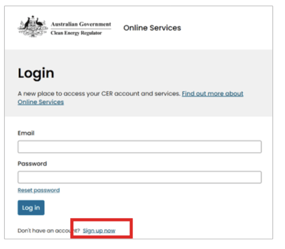
Once in there complete the steps to sign up for an account.
### Step 2: Find the Open ANREU Account Form
Once you have logged into your CER online services account. Click on the **"Other Systems"** menu and select the **" Australian National Registry of Emissions Units (ANREU)"** option.
In here you should see an option that says "Open an ANREU Account". Click on this page and it will take you to some instructions about setting up your account.
Make sure you read this section carefully as there is some things you can miss.
### Step 3: Complete the complementary forms
When you arrive on the "Open an ANREU Account" form you will see instructions about additional forms that need to be completed before you submit your account application.
**If you are an individual or a sole trader: **you need to complete the "Register an individual" form and save it in your account before you complete the "Open your ANREU Account form". This form will be attached to your ANREU account application when you complete that. If your an individual you will only need to do this form and you are good to go.
**If you intend to hold ACCU's as an organisation** such as a company, trust, council or similiar organisation where multiple people may be involved**,** you will need to:
1. Complete the "Register an Organisation" form to register your organisation.
2. You will need to decide on your authorised representatives:
Authorised representatives are individuals nominated to operate the ANREU account. You can nominate just one authorised representative, however for fraud and mistake prevention it is recommended by the clean energy regulator to have at least two authorised representatives. This way one person can not act alone in making the decisions around your credits and less mistakes are made.
3. For each chosen authorised representative you will need to complete a "Register an individual" form. This includes the person who's account you are applying on if not already completed and anyone else you would like to nominate to be a representative.
Once you have completed these for the organisation and any individuals- you can proceed to completing the open an ANREU account form. (instructions above on where to find that in CER online services.)
### Step 4: Complete the "Open an ANREU Account form"
Once you have completed the necessary forms mentioned above. Follow the steps in the "Open an ANREU Account" form to complete your ANREU Application.
This should be fairly simple now that you have completed the other forms. You will be able to select the organisations and individuals you registered before inside this form now.
HANDY TIP:
If you want to save something and come back to it- you can save your progress at the bottom of the page using the save draft button.

### Step 5: Let us know you have created your account
Once your account is created please inform us at AgriProve and we will put it on record for you. As it is your own account we will not be informed if you have created an account and that is where you would like your credits to go in future if you don't let us know.
### Step 6: The Clean Energy Regulator will review your application.
Once you have submitted the application to the clean energy regulator- they will review it, contact you with any issues and notify you of your next steps.
#### **If you have any questions or need help with this process contact your AgriProve contact or call us on 1300 GO SOIL.**
- [General](https://help.agriprove.io/general?hsLang=en)
- [Soil Carbon Projects](https://help.agriprove.io/soil-carbon-projects?hsLang=en)
- [AgriProve Platform](https://help.agriprove.io/agriprove-platform?hsLang=en#main-content)
- [Emission's Summary](https://help.agriprove.io/agriprove-platform?hsLang=en#emissions-summary)
- [Nature and Climate Scores](https://help.agriprove.io/agriprove-platform?hsLang=en#nature-and-climate-scores)
- [Maps](https://help.agriprove.io/agriprove-platform?hsLang=en#maps)
- [Emissions Breakdown](https://help.agriprove.io/agriprove-platform?hsLang=en#emissions-breakdown)
- [ReadyGraze](https://help.agriprove.io/agriprove-platform?hsLang=en#readygraze)
- [AgriProve Credentials](https://help.agriprove.io/agriprove-credentials?hsLang=en#main-content)
- [Greenham Beef Sustainability Standard](https://help.agriprove.io/agriprove-credentials?hsLang=en#greenham-beef-sustainability-standard)
- [Greenham NEVER EVER Standard](https://help.agriprove.io/agriprove-credentials?hsLang=en#greenham-never-ever-standard)
- [Deforestation-Free Beef](https://help.agriprove.io/agriprove-credentials?hsLang=en#deforestation-free-beef)
- [ISCC](https://help.agriprove.io/agriprove-credentials?hsLang=en#iscc)
- [AgriProve Partners](https://help.agriprove.io/agriprove-partners?hsLang=en#main-content)
- [Ceres Tags](https://help.agriprove.io/agriprove-partners?hsLang=en#ceres-tags)
- [Verterra](https://help.agriprove.io/agriprove-partners?hsLang=en#verterra)
- [FAQ's](https://help.agriprove.io/faqs?hsLang=en)
- [Soil Experts](https://help.agriprove.io/soil-experts?hsLang=en)
- [Customer Resources](https://help.agriprove.io/customer-resources?hsLang=en)
# AgriProve HQ
Copyright © 2026, AgriProve HQ